Per-App VPN & Network Bridge
Many modern VPN applications on Android (version 10 and above) use Per-App Routing (also known as Split Tunneling). This configuration creates a unique challenge for sharing your connection:
- The Conflict: If you "Include" Every Proxy in your VPN, the proxy becomes invisible to other devices on your local Wi-Fi.
- The Result: Your laptop or TV cannot connect to the proxy port, even though it's running.
The Every Proxy Network Bridge was created specifically to solve this "VPN vs LAN" conflict.
How the Network Bridge Works
The Network Bridge acts as a middleman. It allows Every Proxy to remain visible to your local network while still sending its outbound traffic through the VPN.
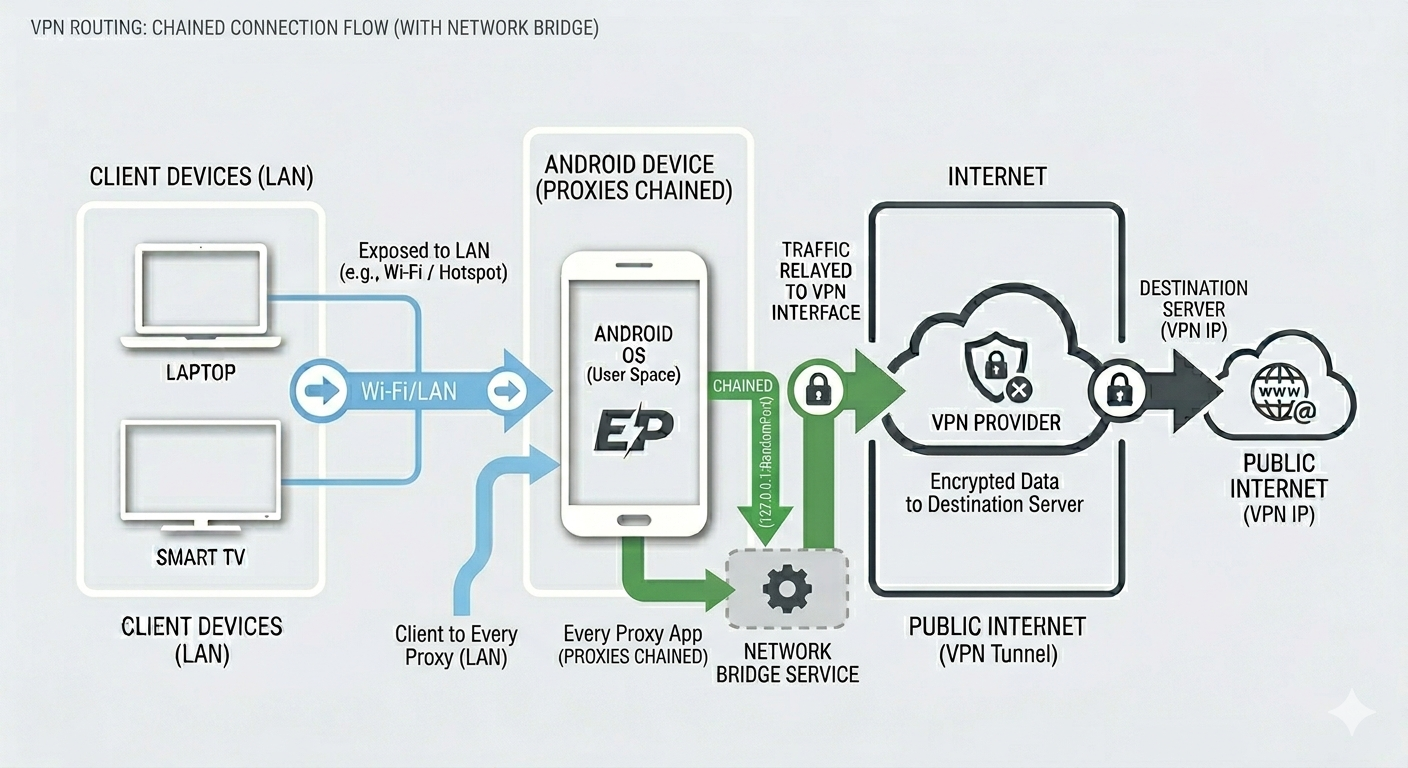
The Routing Path:
Secondary Device → Every Proxy (Local LAN) → Network Bridge (Localhost) → VPN Tunnel → Internet
Why Two Apps?
By using a separate app (the Bridge), you can configure your VPN's "Per-App" settings as follows:
- Every Proxy: Excluded from VPN (making it visible to your Wi-Fi/Hotspot).
- Network Bridge: Included in VPN (allowing it to access the VPN tunnel).
Setup Instructions
Follow these steps only if you are using a Per-App VPN (like WireGuard, ExpressVPN, or any client with an "Allowed Apps" list).
1. Install & Configure
- Install Every Proxy and the Every Proxy Network Bridge from the Google Play Store.
- In your VPN App, go to settings and look for "Split Tunneling" or "Per-App VPN."
- Exclude Every Proxy from the VPN list.
- Include Every Proxy Network Bridge in the VPN list.
2. Activate the Bridge
- Open Every Proxy.
- Tap on Settings.
- Toggle the Network Bridge switch to ON.
- Start your desired proxy (HTTP or SOCKS).
3. Maintain Stability
Because the Bridge runs in the background, Android may attempt to kill it to save battery.
- Go to your phone settings and set the Battery Optimization for both apps to Unrestricted.
- Reference: Battery Optimization Guide
When is the Bridge NOT needed?
Most users do not need the Network Bridge. You can skip it if:
- You are not using a VPN.
- You are using a System-wide VPN (one that does not have an app-selection list).
- You are using Android 9 or below.
Performance Note
Every "hop" in a network adds a small amount of latency. If your VPN allows Every Proxy to work without the Bridge, we recommend keeping the Bridge disabled to ensure the fastest possible connection.
Troubleshooting the Bridge
- Bridge Failed to Start: Check your Notifications. If the Bridge fails (e.g., due to a port conflict), an error message will be displayed in the notification drawer.
- Connected but no Internet: Ensure the Bridge is explicitly "Allowed" or "Included" in your VPN app settings. If the Bridge is blocked by the VPN, no traffic will flow.