Battery Optimization Guide
Android’s built-in battery management is designed to save power by freezing or killing apps that run in the background. Because Every Proxy acts as a network gateway, it must remain active at all times to maintain your connection.
If Android "optimizes" Every Proxy or the Network Bridge, your client devices will immediately lose internet access.
Google / Stock Android (Pixel & Others)
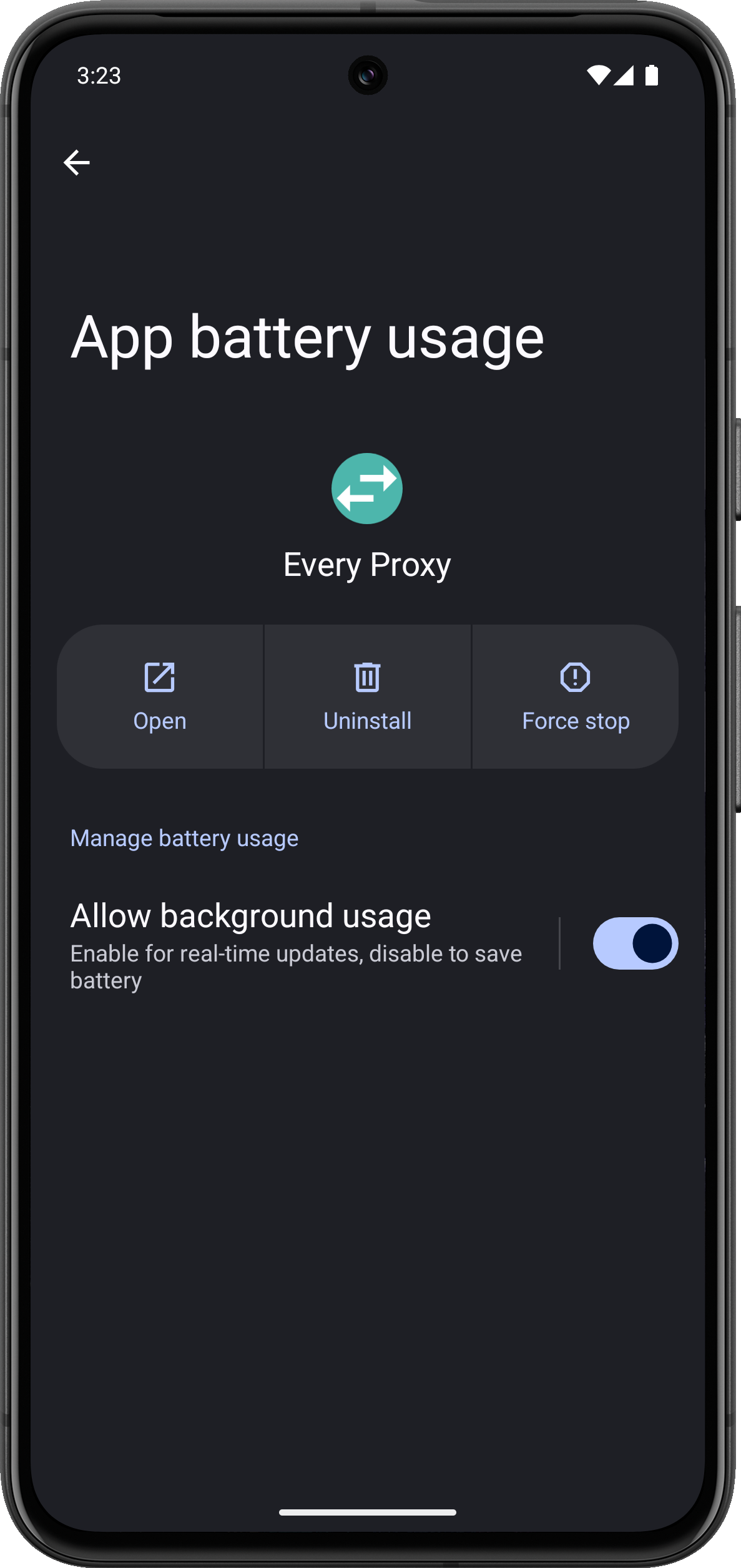
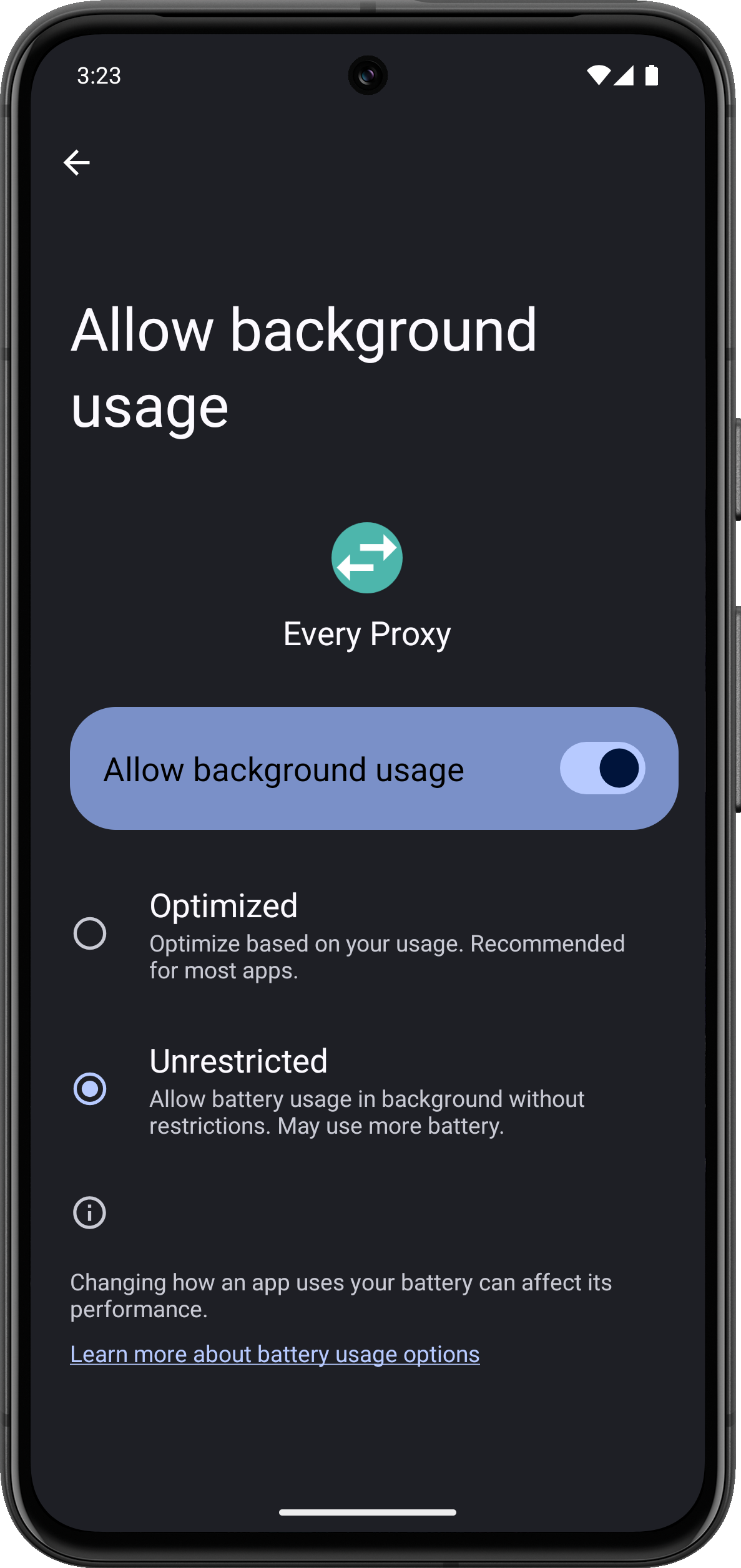
Modern Android versions use three specific power profiles. By default, apps are set to Optimized, which is insufficient for a persistent proxy service.
- Recommended Action: Set both Every Proxy and the Network Bridge to Unrestricted.
- User Guide: Manage Battery Usage on Pixel Devices
Path: Settings → Apps → Every Proxy → App battery usage → Allow background usage → Unrestricted.
Samsung Devices (One UI)
Samsung uses "Background usage limits" which can force apps into a deep sleep state. To ensure stability, you should add Every Proxy to the "Never sleeping apps" list.
- Recommended Action: Add apps to Never sleeping apps.
- Community Reference: Samsung Battery Optimization
Path: Settings → Battery and device care → Battery → Background usage limits → Never auto sleeping apps → + (Add Every Proxy).
Xiaomi / Redmi / Poco (MIUI & HyperOS)
Xiaomi devices use an aggressive "Battery Saver" profile by default. You must explicitly disable these restrictions for both apps.
- Recommended Action: Set to No restrictions and enable Autostart.
- Community Reference: Xiaomi Battery Optimization
Path: Settings → Apps → Manage apps → Every Proxy → Battery saver → No restrictions. Also ensure "Autostart" is toggled ON in the same App Info menu.
OnePlus Devices (OxygenOS)
OnePlus requires you to manually toggle background and auto-launch permissions for each application.
- Recommended Action: Enable Allow background activity and Allow auto-launch.
- Community Reference: OnePlus Battery Optimization
Path: Settings → Apps → App management → Every Proxy → Battery usage → Allow background activity & Allow auto-launch.
Why "Unrestricted" Matters
When a proxy connection is active, Every Proxy maintains an open "socket." Android's "Optimized" mode treats background network traffic as a low priority. If the system needs RAM or power for another app, it will close Every Proxy’s socket, causing your connected devices to time out.
By setting the app to Unrestricted:
- The network listener stays active even when the screen is off.
- The "handshake" between Every Proxy and the Network Bridge isn't interrupted.
- The persistent notification remains active, signaling to the system that the app is performing a vital task.
Summary
If your connection drops as soon as the phone screen turns off, battery optimization is almost certainly the cause.
- Check Every Proxy: Set to Unrestricted / No Restrictions.
- Check Network Bridge: Set to Unrestricted / No Restrictions.
- Check VPN App: Ensure your VPN app is also excluded from optimizations.
Don't see your device?
Manufacturers change these menus frequently. If you cannot find these settings, we recommend visiting DontKillMyApp.com, a community-driven project that provides detailed guides for almost every Android brand.